Understanding Variable Scope in Golang: Local vs. Global Variables

Introduction
In Golang, variable scope determines where a variable can be accessed and modified within a program. It sounds like a beginner topic — right up until a global you thought you updated turns out to be untouched, and the culprit is a single :=. Understanding local and global scopes is crucial for writing maintainable and bug-free code. Additionally, when working across multiple packages, handling global variables correctly ensures modular and reusable code.
This article will cover:
- Local vs. Global variables in Golang
- Updating global variables inside a function
- Using global variables across multiple packages
- Best practices for managing global variables
Local vs. Global Variables in Golang
Local Variables (Function/Block Scope)
A variable is local when declared inside a function, loop, or block. It is only accessible within that specific function or block and cannot be used elsewhere.
Example: Local Variable Scope
package main

import "fmt"

func main() {
    x := 10  // Local variable in main()
    fmt.Println(x) // Accessible within main()

    if true {
        y := 20 // Local to the if block
        fmt.Println(y)
    }

    // fmt.Println(y) // ERROR: y is out of scope here
}
xis local tomain().yis local to theifblock and cannot be accessed outside of it.
Global Variables (Package Scope)
A global variable is declared outside of any function and can be accessed throughout the package.
Example: Global Variable
package main

import "fmt"

var globalVar = 100 // Global variable

func main() {
    fmt.Println("Before update:", globalVar)
    updateGlobalVar()
    fmt.Println("After update:", globalVar) // Value changed globally
}

func updateGlobalVar() {
    globalVar = 200 // Modifying global variable
}
globalVaris declared outside any function, making it available to all functions in the package.updateGlobalVar()modifiesglobalVar, and the change is reflected globally.
Updating a Global Variable Inside a Function
Global variables can be updated directly inside functions unless shadowed by a local variable with the same name.
Example: Directly Modifying a Global Variable
var counter = 0 // Global variable

func increment() {
    counter++ // Modifies the global variable
}

func main() {
    fmt.Println("Before increment:", counter)
    increment()
    fmt.Println("After increment:", counter) // Value updated globally
}
Common Mistake: Variable Shadowing
A common mistake is redeclaring a global variable using :=, which creates a new local variable instead of modifying the global one. This is the bug that looks like it works — the function prints the new value, while the global quietly keeps the old one.
var data = "Global"

func changeData() {
    data := "Local" // Creates a new local variable, doesn't modify the global one
    fmt.Println("Inside function:", data)
}

func main() {
    fmt.Println("Before:", data)
    changeData()
    fmt.Println("After:", data) // Still "Global"
}
- Fix: Use
data = "Modified Global"instead of:=to update the global variable.
Using Global Variables Across Multiple Packages
Global variables across multiple packages must be exported (using an uppercase name) and imported correctly.
Project Structure Example
project/
│── main.go
│── config/
│   ├── config.go
Step 1: Define a Global Variable in config Package
Create config/config.go and declare an exported variable:
package config

import "fmt"

// Exported global variable (uppercase first letter)
var AppName = "My Awesome App"

func PrintConfig() {
    fmt.Println("App Name:", AppName)
}
Step 2: Access the Global Variable in main.go
Import the config package and use the global variable:
package main

import (
    "fmt"
    "project/config" // Importing the package
)

func main() {
    fmt.Println("Application:", config.AppName) // Accessing global variable
    config.PrintConfig()
}
AppNameis accessible because it’s exported.config.PrintConfig()prints the variable.
Step 3: Modifying Global Variable from Another Package
Global variables in a package can be updated from other packages if they are exported.
package main

import (
    "fmt"
    "project/config"
)

func main() {
    fmt.Println("Before:", config.AppName)

    // Modifying global variable
    config.AppName = "Updated App Name"

    fmt.Println("After:", config.AppName)
}
Preventing Modification with Getter Functions
To protect a global variable from modification outside its package, make it private and use a getter.
package config

// Unexported variable
var appName = "My Secure App"

// Getter function
func GetAppName() string {
    return appName
}
Now, appName cannot be modified from main.go, but it can be accessed via config.GetAppName().
Using sync.Once for Initialization
Use sync.Once to ensure a global variable is initialized only once.
package config

import "sync"

var (
    once    sync.Once
    AppName string
)

func InitConfig() {
    once.Do(func() {
        AppName = "Initialized App Name"
    })
}
package main

import (
    "fmt"
    "project/config"
)

func main() {
    config.InitConfig()
    fmt.Println("Application:", config.AppName)
}
Best Practices for Global Variables
- ✅ Minimize global variables: overuse leads to maintenance challenges.
- ✅ Use getters/setters: if modification should be restricted, expose functions instead of the variable.
- ✅ Use
sync.Oncefor initialization: prevent multiple (and racy) initializations. - ✅ Avoid unnecessary package dependencies: keep global variables in dedicated packages to prevent circular imports.
Conclusion
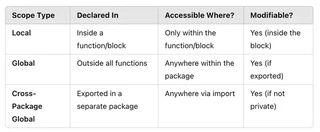
Golang’s variable scope follows clear rules: a variable is local by default, package-wide when declared at the top level, and visible across packages only when exported.
By following best practices, you can write scalable, modular, and maintainable Go programs. 🚀
